Background
SocialYU was a project I completed along with a partner for a User Interfaces course I took as part of my Digital Media bachelor's degree.
It consists of user research, design, and creating low fidelity prototypes for a mobile app.
The Problem
York University has a great student community, but many students struggle to find social connection and stay informed about campus events because of scattered information and limited promotion.
The Solution
A mobile app that centralises all student-run events and club activities, making it easy for students to discover, follow, and engage with campus life through a personalised, social interface.

The Plan:
1. User Analysis
2. User Research
3. Prototyping & Evaluation
4. Developing
Overview
Role
Product Design
Timeline
12 weeks
Tools used
Balsamiq, Miro
SocialYU
1. User Analysis
User profile
We began by defining the characteristics of our user population using personas and scenarios, which was our initial understanding of who the users of your system are based on what we knew and researched before interviewing the users.
This is the user profile and corresponding user scenario I created.

User scenario
Hana Dewi, an international student from Indonesia, has just finished a long day of business lectures at York University and heads to the closest prayer room to finish up her daily prayers. Afterwards, she grabs a cup of hot tea and sits in the cafeteria, scrolling on her phone. She misses the sense of community she had back home- hanging out with her friends after class, attending Islamic lectures, Friday prayers with her family. She has heard about York’s Muslim Students’ Association (MSA) but isn’t sure how to get involved. She opens the SocialYU app and searches for upcoming events. She immediately finds an MSA-hosted dinner followed by a lecture happening that evening, just a few buildings away. The event page shows who’s attending, details about the menu (halal-certified), and a brief description about the guest speaker discussing faith and student life. Excited but a little nervous about going alone, she checks the "Find Friends" feature and sees a few other new students who are also attending for the first time. With just a few taps, she messages a student named Aisha who is also looking for company. They agree to meet outside the venue. At the event, Hana enjoys a warm meal, listens to an inspiring talk, and leaves feeling connected. Later, she follows the MSA group on SocialYU, ensuring she never misses another event again.
2. User Research
We then created an interview script to interview five potential users to understand their needs, wants, pain points, and sources of frustration. The objective of the interviews was to develop an understanding of what needs to be designed to meet the needs of users.


These are the raw notes we took from the interviews. The interviews also consisted of a second part that used the scenarios designed earlier. We asked users to role-play some of the scenarios while thinking out aloud.
To organize and analyze the data gathered from our user research, we developed an affinity diagram using Miro and listed the key requirements and user needs for the application to be designed.

3. Prototyping and Evaluation
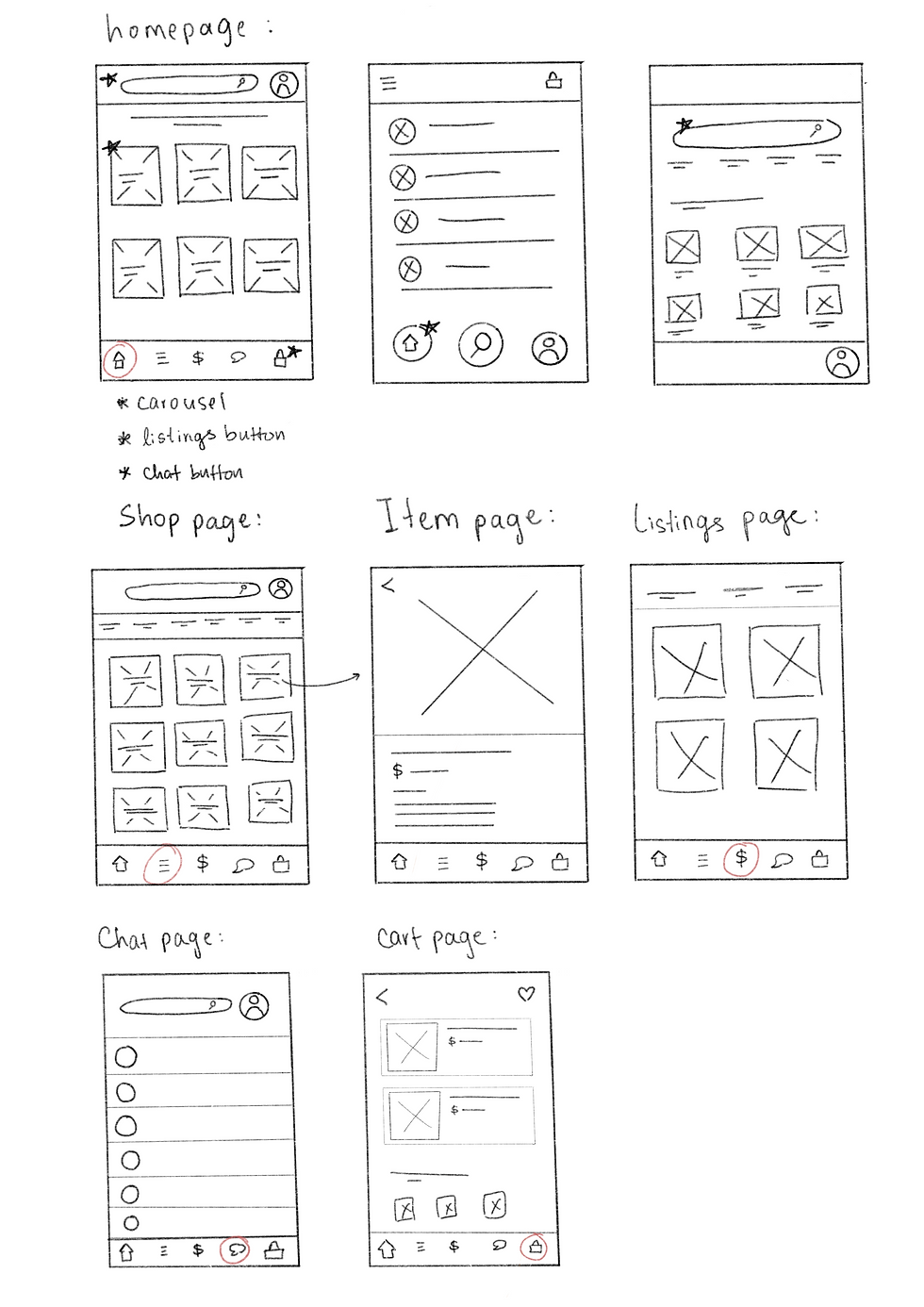


I first made a few rough sketches of potential designs on Procreate, and after discussing what would work best with my teammate and referring to the user research we conducted , I proceeded to create a low-fidelity mockup of the designs in Balsamiq.
We also conducted a heuristic evaluation to find usability issues in the prototype using Neilson’s 10-heuristics.

These are the consolidated results I found from the evaluation. Most importantly, I found that our design lacked feedback, documentation and ability to undo actions.
4. Developing
We addressed key usability issues from a heuristic evaluation, focusing on error prevention, user support, and control. I added event de-registration, helpful error messages, a support page with FAQs, and features like calendar integration and quick event access to improve user experience, navigation, and platform usability.

(Event de-registration, confirmation and error message shown)
We then conducted another user study involving five university students who were asked to complete a few tasks using a low-fidelity prototype guided by the Wizard-of-Oz technique. Participants thought out loud during the session while we took note of their actions and behavior. The prototype session was followed by a short usability survey to evaluate their experience, satisfaction, and perception of the prototype’s design.


Based on which we created another affinity diagram in order to identify patterns and generate insights


Which I used to propose these changes to improve the overall usability and user satisfaction of the prototype.

to view events
Home

to stay in touch
Messaging

Bringing us to the final prototype I created for this project using Balsamiq
to view friends and groups
Connections

Notfications
to stay updated

to keep track of events
Calendar

privacy, security, FAQs
More Options
